Looking for the best email signature creator to elevate your emails? Discover how Newoldstamp makes it easy to create professional, on-brand email signatures that impress recipients and boost your image.
I’ll be honest – I used to ignore my email signature. It was just my name and maybe a phone number. But I soon realized that having a polished email signature is like wearing a good outfit to a meeting – it instantly boosts credibility. If you send emails for work, school, or business, you have an opportunity to impress with every send. In fact, the average office worker sends about 40 emails each day. That’s 40 chances daily to share your brand or contact info in style! To do this right, you need the best email signature creator at your disposal. That’s where I found Newoldstamp, and it has completely changed how I approach email sign-offs.
Newoldstamp is more than just an email signature generator – it’s a full platform to design, manage, and deploy professional signatures easily. In this post, I’ll share my personal experience with Newoldstamp and why I think it’s the best email signature maker out there. I’ll also sprinkle in some tips, analogies, and even a great deal I discovered (hint: I snagged it via one of those AppSumo deals!). By the end, you’ll see how a tool like Newoldstamp can turn your ordinary email footer into a powerful marketing and branding asset. Let’s dive in!
Why a Professional Email Signature Matters
You might be wondering, “Do I really need a fancy email signature?” The answer is a resounding yes! Think of your email signature as your virtual handshake – it’s often the last thing someone sees in your email, and it leaves a lasting impression. A well-crafted signature makes you look professional and trustworthy. In fact, a recent survey found that branded email signatures were the #1 factor (57% of respondents) that made consumers trust an email from a business. That’s huge! It means people feel more confident and positive about an email if it ends with a clear, professional signature.
On the flip side, not having a good signature can be a missed opportunity. Imagine handing someone a plain white business card with just your name – not very memorable, right? Similarly, 70% of consumers get frustrated when a brand’s emails have no signature. It feels impersonal or even suspicious. A branded signature with your name, title, company, and maybe a logo or photo shows that you’re legitimate. It’s like wearing a badge of authenticity in every message.
For young professionals, students, or anyone trying to make a mark, an email signature can even help you stand out. (I remember as a student, adding a simple signature with my LinkedIn profile made me feel so grown-up!) Newoldstamp’s website notes that even students can stand out to potential employers with a professional signature. It’s part of your personal brand. Whether you’re 18 or 45, your emails will look more polished with a consistent signature block at the bottom.
The bottom line: if you communicate by email, investing a little time in a great signature is totally worth it. And you don’t need design skills or coding knowledge to do it – you just need the right tool. Let me introduce you to how I found the best email signature creator for the job.
My Quest for the Best Email Signature Creator
A while back, I decided it was time to up my email game. I Googled things like “best email signature maker” and “email signature creator” hoping for an easy solution. I did find some free online generators, but they were clunky or had limited designs. I even tried making one manually in Gmail and Outlook – oh boy, that was frustrating (aligning images and text, making sure it looked good on mobile… not fun). After some trial and error, I stumbled upon Newoldstamp, and it immediately caught my eye as a professional yet user-friendly service.
From the moment I landed on their site, I could tell this was built to be the best email signature creator for individuals and teams alike. They advertise that with Newoldstamp you can “create, assign, and manage professional email signatures for your whole team in one place.” That sounded perfect for me, as I sometimes help manage our small team’s branding. No more chasing coworkers to update their Outlook settings – Newoldstamp promised a one-stop, centralized solution.
What really sold me was the idea that every email could become a marketing opportunity. One tagline said Newoldstamp lets you “turn every email into a marketing channel”. As someone working in a small business, I loved this concept. We all send emails, so why not use the footer to promote a product, a link, or an announcement? I’ll talk more about this feature later, but it struck me as genius – an easy win for marketing without extra effort.
So, I signed up for a trial. (They offer a free trial, which was great to test the waters.) The experience was smooth from the start. I didn’t need any tutorials to get going; the interface was intuitive for an email signature generator. In the next sections, I’ll break down some of my favorite features of Newoldstamp and how it solved the problems I had with creating email signatures before.
Key Features of Newoldstamp (Why It Stands Out)
What makes Newoldstamp the best email signature maker in my opinion? Let me highlight a few key features and benefits that I personally found awesome:
- Easy, Code-Free Signature Design: Newoldstamp provides a user-friendly online editor where you can build a signature without any coding skills. I just input my details (name, title, phone, etc.), upload a photo and logo, and choose a template. The generator took care of the formatting. The result? A polished, mobile-friendly signature that looked great on every device and email client I tested. Crafting a stylish signature has never been easier – no more wrestling with Outlook’s editor or HTML code!
- Professional Templates and Customization: I was impressed by the variety of templates. Whether you want a conservative design or something more eye-catching, there’s a gallery of pre-made designs to choose from. I picked one that matched my branding colors and tweaked it. You can change layouts (vertical, horizontal, etc.) to suit your taste. The templates are fully customizable so your signature doesn’t look cookie-cutter. According to Newoldstamp, they offer a wide range of templates to help your signature showcase your competence and expertise. I also loved the live preview feature – as I edited my signature, I could instantly see how it would look. This real-time preview saved me from a lot of guesswork.
- All the Right Elements: A great signature isn’t just a name and title. Newoldstamp makes it easy to add social media icons, logos, banners, and call-to-action buttons. For example, I added LinkedIn and Twitter icons that link to my profiles – a nice touch to get more connections. (Newoldstamp’s editor encourages this because linking to your active social profiles can increase trust and demonstrate expertise.) I also included a promotional banner at one point to announce a webinar our company was hosting. It’s as simple as uploading an image and adding a hyperlink. Suddenly, every email I sent was subtly advertising our webinar – very cool.
- Team Management & Consistency: If you work with a team or company, consistency is key. Newoldstamp really shines here. You can create a master signature template and then generate unified signatures for everyone by importing their details. When I helped standardize our team’s emails, I just set up the template once (with our company logo, style, etc.) and Newoldstamp generated matching signatures for each team member – no one had to do it manually. Even better, if we needed to update something (say we won an award and wanted to add a badge), I could update the template and push changes to all signatures at once. No more chasing colleagues to “please update your signature, Bob!” – Newoldstamp does it in one click.
- Integration with Email Platforms: Newoldstamp isn’t a static generator; it plays nicely with major email systems. It has seamless integration with Google Workspace (Gmail), Office 365, Exchange, and more. In my case, we use Google Workspace at work. With Newoldstamp, I could automatically deploy the signatures to everyone’s Gmail without needing each person to copy-paste it into their settings. That saved a ton of time and ensured no one skipped the setup. They also support Outlook, Apple Mail, iOS Mail, Thunderbird – you name it. Basically, they guarantee your email signature looks great across all popular email clients. I tested on a few (Gmail, Outlook, and my iPhone mail app) and indeed, the signature formatting stayed perfect everywhere.
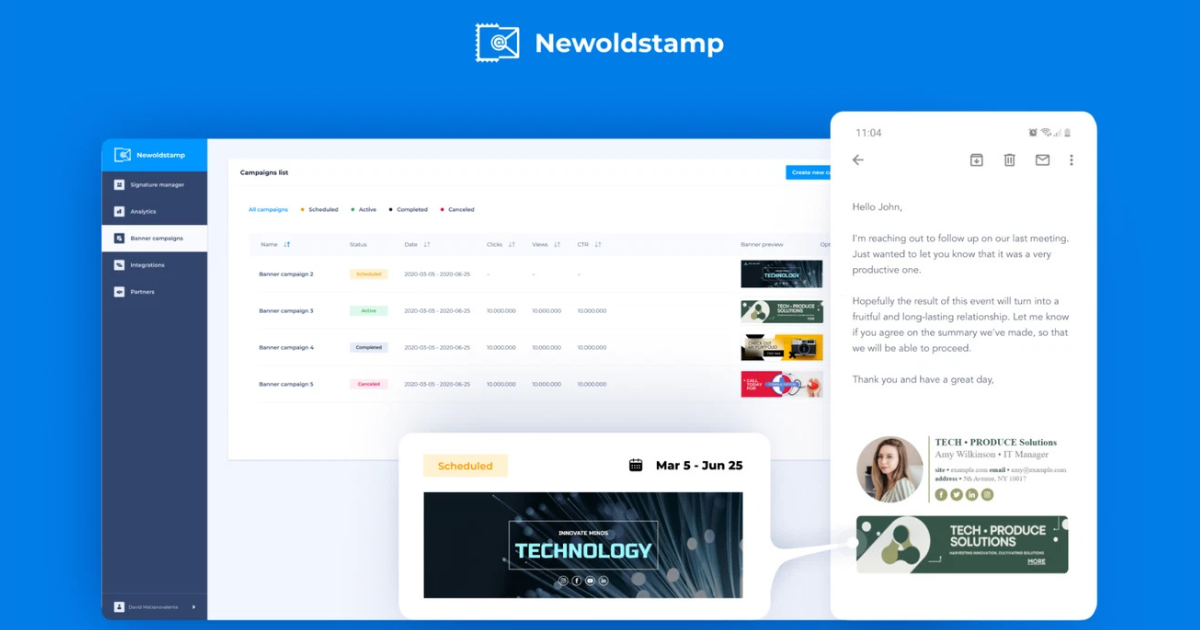
- Email Signature Marketing (Banner Campaigns): Remember I mentioned turning emails into a marketing channel? Newoldstamp lets you create email signature banner campaigns that your team can run. For instance, we added a banner in all employee signatures about a seasonal sale. Newoldstamp allows scheduling these banners and even targeting by department. So, our sales team’s emails showed a “Book a Demo” banner while our support team’s emails showed a “Need Help? Check our FAQ” banner. It’s like free ad space in every outgoing email! This feature effectively turned our employees’ daily communications into a no-brainer marketing channel for new leads. It’s subtle and doesn’t feel intrusive, but it reinforces our messaging with every send.
- Analytics and Tracking: As a data geek, I appreciate that Newoldstamp includes built-in analytics. The platform tracks impressions and clicks on your signature content. I could log in to see how many people viewed or clicked the banner in my email signature – essentially measuring engagement from email signatures, which is something I never could do before. It felt like getting mini Google Analytics for my emails. For example, after running a month-long banner campaign, we saw hundreds of impressions and a solid click-through rate, which translated into actual site traffic. Newoldstamp’s analytics dashboard shows which campaigns are performing best so you can tweak or rotate them. This data-driven approach helped us optimize our email signature marketing strategy – we could literally track performance with in-depth analysis to see what resonated with our email recipients.
- Time Savings & Ease of Use: Perhaps my favorite aspect: Newoldstamp saved me so much time. No more manually updating signatures or helping colleagues format theirs. The centralized dashboard means everything is in one place – truly effortless team email signature management. The founders of Newoldstamp actually created the tool because they were frustrated with how tedious and error-prone manual updates were. I can totally relate – before, whenever something changed (like a new phone number or logo), it was a nightmare getting everyone’s signature updated consistently. With Newoldstamp, one person (like the office admin or marketing lead) can update the master template and push it out to everyone. It’s automation at its best, and it doesn’t require IT support to manage. I felt confident using it from day one, and any time I needed to tweak a design or add a user, it was straightforward.
Newoldstamp provides an intuitive dashboard to manage signatures and even run banner campaigns. Every team member’s email can showcase consistent branding and promotional banners, without any hassle.
As you can see, Newoldstamp packs a punch with features. It’s like having a design tool, a marketing tool, and an IT deployment tool all rolled into one – specifically for email signatures! Now, let’s talk about how you can get your hands on this and whether it offers bang for your buck.

Getting Newoldstamp (Pricing and Deals)
Quality like this usually isn’t free, and Newoldstamp is a premium service. However, I found the pricing quite reasonable considering the value – especially if you manage multiple signatures or run campaigns. They have subscription plans on their website, but I have to tell you about the awesome deal I got.
As a fan of AppSumo deals, I was thrilled when I saw Newoldstamp featured as one of AppSumo’s lifetime deals. For those who don’t know, AppSumo is a site that offers lifetime access to software for a one-time fee (these deals are gold for entrepreneurs on a budget). Newoldstamp’s AppSumo deal meant I could pay once and use Newoldstamp forever without recurring fees. I jumped on that immediately!
At the time of writing, the AppSumo lifetime deal for Newoldstamp starts at around $39 for 5 signatures (which was originally valued much higher). There are higher tiers if you need more signatures (10, 15, 25, etc., with a slightly higher one-time cost for each tier). In my case, one code (5 signatures) was enough for my small team, and $39 is a steal for what we’re getting. To put it in perspective, many other top email signature management tools charge that per month for similar features. Here it was $39 once – amazing value.
Even if you miss the AppSumo window, Newoldstamp offers a free trial and various plans on their site, so you can choose monthly or annual billing. But if the lifetime deal is still available, I highly recommend grabbing it. It’s also worth noting that AppSumo deals come with a 60-day money-back guarantee – you can essentially try Newoldstamp risk-free via AppSumo and refund if it’s not a fit (but I suspect you’ll love it as much as I do).
Newoldstamp has been around for a while (since 2015, I believe) and has a solid reputation. It’s even earned high ratings on platforms like G2 and Capterra (4.7/5 stars on G2, for example). Knowing that other users rated it highly gave me extra confidence that I was investing in the right tool.
In summary, I find Newoldstamp absolutely worth the price for the professionalism and convenience it adds to our daily communications. If you catch a deal or have an AppSumo code, even better!
👉 Grab the Newoldstamp Lifetime Deal on AppSumo – One-time payment, lifetime access!
Final Thoughts
After using Newoldstamp for a while, I can confidently say it lives up to the title of the best email signature creator in my book. My emails now look consistently branded and polished. I’ve even had clients and partners compliment my signature or say “hey, how did you add that cool banner to your emails?” – to which I happily share my secret weapon.
Not only does Newoldstamp make me look more professional, but it also subtly markets my business with every send. It’s almost like having a little digital marketing assistant who stamps (pun intended) every email with a finishing touch of branding. And as someone who’s not a designer, I appreciate how easy it is – I feel like a pro without actually having to be one.
If you’re still on the fence, remember that you can try it out with no commitment (free trial or even the free email signature generator on their site for a single signature). But if you’re serious about email communication – whether you’re a solo freelancer, a student, or part of a company – Newoldstamp can save you time, make your life easier, and ensure your emails make a great impression. It turned my daily email routine from “ugh, I should really update my signature someday…” to “yay, my signature looks awesome and I don’t have to worry about it!”
Give it a shot and see the difference a professional email signature can make. Your future self (and your email recipients) will thank you!
FAQ
What is Newoldstamp and how does it work?
Newoldstamp is an online email signature generator and management platform. It helps you easily create a professional email signature using templates – just fill in your info, and it designs the signature for you. Beyond that, Newoldstamp allows centralized management of signatures for teams (so everyone in a company can have a consistent look). It works with email providers like Gmail, Outlook, etc., by letting you install the signatures or even auto-sync them. Basically, it takes the hassle out of making and updating email signatures, so you don’t need any coding or design skills to use it.
Is Newoldstamp free to use?
Newoldstamp offers a free trial for its premium features, and on their website they even have a free email signature creator tool for personal use (this lets you create a basic signature at no cost). However, the more advanced features – like managing multiple signatures, using marketing banners, analytics, and automatic syncing – are part of their paid plans. If you have just one email and want a simple signature, you can try the free generator. For business or extended use, you’d likely need a subscription or a lifetime deal license.
Does Newoldstamp have an AppSumo lifetime deal?
Yes – in fact, that’s how I got Newoldstamp! 🚀 Newoldstamp has been featured on AppSumo, where you can get a lifetime deal (one-time purchase) for the service. This AppSumo deal gives you lifetime access to Newoldstamp’s features for a flat fee, which is a fantastic value. The deal is tiered by how many signatures you need (for example, 5 signatures, 10 signatures, etc.). If you see Newoldstamp on AppSumo, it’s a great opportunity to grab it. Keep in mind AppSumo deals are time-limited, but they do occasionally come back. So if you’re searching for AppSumo lifetime deals related to email signature software, Newoldstamp is one to watch for.
Why use a tool like Newoldstamp instead of just doing it myself?
Great question! You can manually create an email signature using your email client’s settings, but there are several reasons a dedicated tool helps: – Consistency: With a tool, especially for teams, you ensure everyone’s signature follows the same professional format (font, color, layout). Manually, it’s hard to get uniform results across many people. – Design & Features: Newoldstamp provides polished templates, social media icons, banners, and more. Doing that yourself might require designing images or knowing HTML. Newoldstamp makes it point-and-click. – Time Savings: It’s much faster to update or create signatures with a generator. Newoldstamp can bulk-create or update signatures (e.g., when your company has a rebrand or a new promo) in one go, whereas doing it yourself means editing each signature one by one. – Marketing & Analytics: This is nearly impossible to do manually. Newoldstamp lets you add marketing banners and then track their performance with analytics. If you just make a basic signature yourself, you miss out on that data and flexibility. In short, using an email signature creator like Newoldstamp takes the grunt work out and adds functionality you wouldn’t have if you DIY. It ensures your signature looks professional with minimal effort on your part. Once I switched, I never wanted to go back to manually tweaking signatures in email settings!